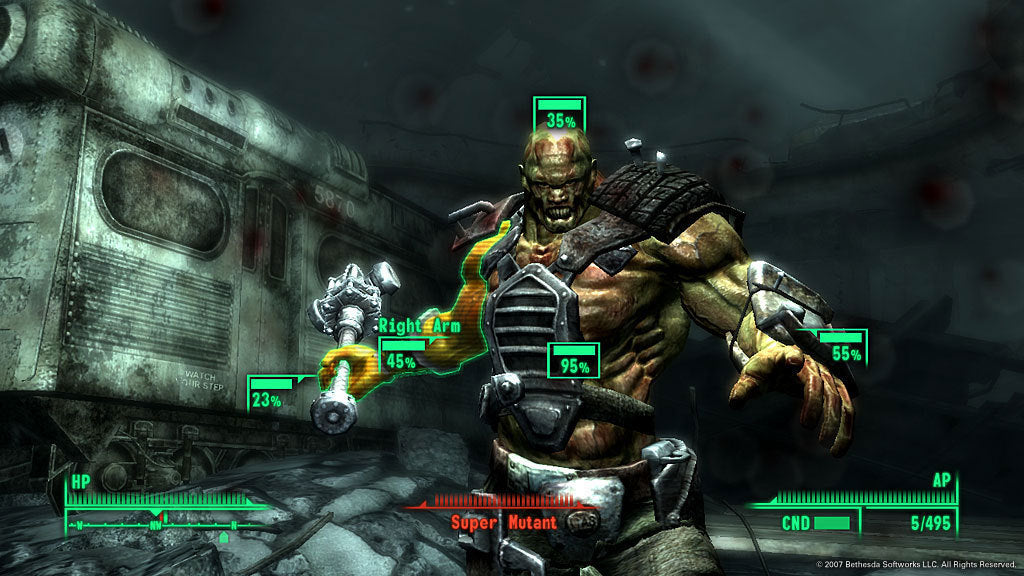
The raider’s head has a tempting outline around it. The percentage beside that outline is less encouraging. Fallout 3 has paused long enough for you to make a decision, and the best decision might be to stop trying for the dramatic shot.
In Fallout 3, V.A.T.S. brings together hit chance, limb condition and Action Points. They describe different parts of an attack. Reading them together gives you a better plan than selecting the head until the queue fills. These images show the original PC game; Zypher’s linked physical copy is Xbox 360.

A percentage is a chance, not a damage rating
The official manual identifies the number beside a targeted body part as the chance that an attack hits it. The target’s overall health and the condition of each limb have their own displays.
That distinction matters when you compare a difficult headshot with a more dependable shot elsewhere. A body part can be attractive because of the result you want, while the current chance of hitting it makes the attempt costly. Decide which outcome you are buying with the available Action Points.
For a first outing, inspect two possible targets before confirming. Notice whether the expected health change and hit chance point toward the same choice. You do not need to memorize a build guide to recognize when the most theatrical option is also the least reliable one.

Crippling a limb can change the next exchange
Fallout 3 tracks body-part condition independently of an enemy’s overall health. The manual describes crippled legs reducing movement and preventing enemy charging or leaping attacks. Crippled arms affect aiming, and an enemy is disarmed when an arm is crippled.
Those are tactical outcomes. If an approaching enemy is the immediate problem, reducing its ability to close the distance can matter alongside raw health damage. If a weapon is making the encounter uncomfortable, consider whether targeting the relevant arm offers a useful answer.
Read the limb’s current condition before committing. A low condition bar gives context to an attack that might look less exciting than another headshot. The point is to understand what you want the enemy to be less capable of doing afterward.

Action Points buy the sequence
The AP bar shows how much of the available budget queued attacks will use. Different attacks can have different costs, and the manual notes that smaller weapons generally require fewer AP per shot. You can also switch between visible enemies while selecting attacks, as long as points remain.
Think about the queue as a short plan. Spending everything on one target can make sense if removing it is the priority. Spreading attacks can make sense when you are trying to affect several threats. Neither arrangement is automatically correct just because the interface lets you select it.
Before accepting, check the sequence rather than only the first shot. Which enemy will still be able to act afterward? Are you counting on a low-probability attack to do essential work? V.A.T.S. gives you time to consider that; use the pause before it becomes a slow-motion record of wishful thinking.

Melee and grenades follow a different targeting rule
The manual describes melee and grenade attacks as full-body attacks in V.A.T.S.; they do not let you select a particular limb. Melee also needs the target close enough to reach.
That is a useful limitation to remember before choosing a tool for a particular purpose. If the plan depends on disabling a specific body part, confirm that the selected attack actually offers that choice. A weapon change can alter what the targeting screen is able to do.
Likewise, do not confuse a visible enemy with one your selected action can reasonably reach. The paused screen is information about the situation in front of you, not a promise that every possible approach is available from the current position.

Your own injured limbs deserve the same attention
The manual applies limb effects to the player as well. It also explains that a Stimpak can be applied directly to a selected limb through the Pip-Boy’s Stats screen. A doctor or a bed provides other healing options.
If aiming or movement has become awkward, inspect the character’s condition before assuming a different weapon will fix it. Then return to the next encounter with a clearer baseline.
A useful V.A.T.S. routine is to identify the threat, compare the chance and limb result, inspect the AP queue and confirm the intended sequence. Fallout 3 is letting you pause the argument with the wasteland. It is worth arriving at an answer before unpausing it.

Shop and sell with Zypher
Browse Fallout 3 for Xbox 360 at Zypher. Check the selected copy’s condition, platform and included items before ordering. Making room for something different? See our trading and selling information.


