Stepping into power armor in Fallout 4 changes more than your silhouette. You have a frame, fitted components and a power supply to think about. The outfit underneath is no longer providing the bonuses you might expect.
The useful way to prepare a suit is to treat those as separate checks. This guide concerns Fallout 4's power armor, using Bethesda Support and Prima's official game guide for the mechanics. The screenshots come from Zypher's matching Xbox One product gallery.

Start with the frame, then inspect the pieces
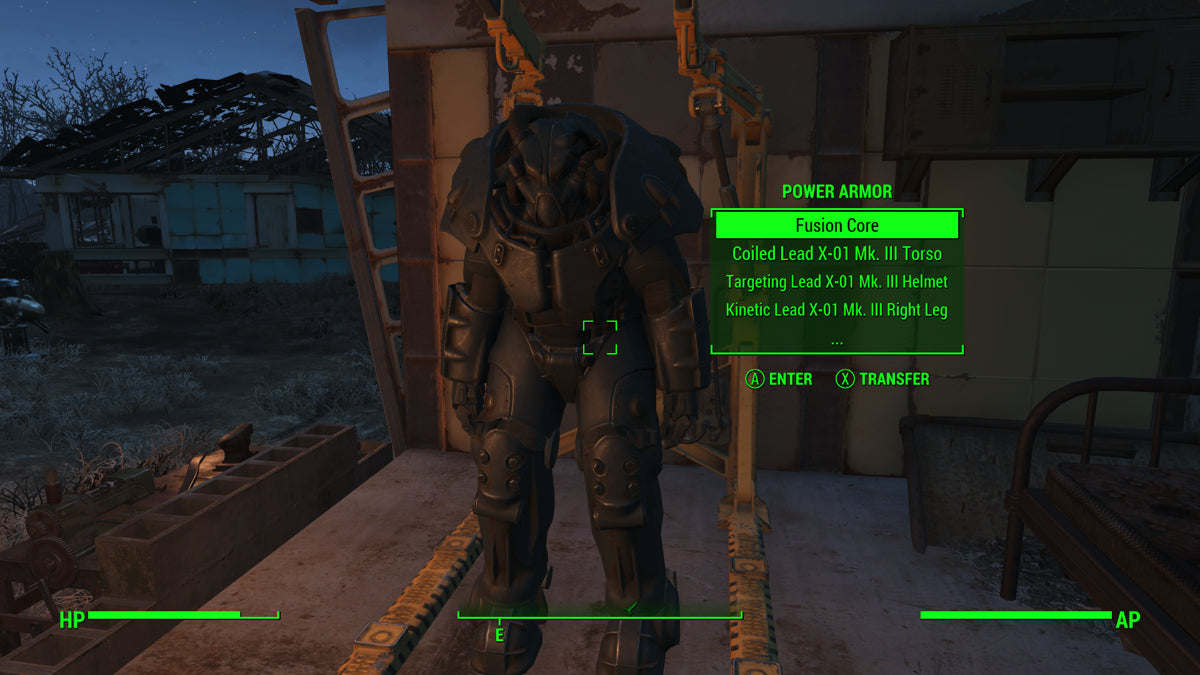
Prima's guide distinguishes the frame from the armor parts attached to it. The frame does not appear as an ordinary wearable item in the Pip-Boy apparel list. Fitted parts are a separate layer, and badly damaged components require repair before they can be equipped again.
For a useful pre-trip check, inspect what is actually fitted. An impressive-looking suit is less helpful information than knowing which components are installed and ready. If you have been swapping pieces between suits, make this check before a long outing rather than after reaching the dangerous part.
That distinction also helps when you bring something home. A newly found component is not another complete suit. Decide which frame it belongs on and what problem it improves: replacing a damaged piece, changing the intended configuration or becoming part of a second outfit.

Read the repair requirement before spending resources
Power armor parts can be damaged, and their repair materials vary. Prima identifies the power armor station as the place to restore unusable parts. Treat the repair display as a concrete shopping list, rather than assuming every suit needs the same materials.
Our practical suggestion is to do the inspection before your next scavenging trip. If one component is holding up the suit, knowing its requirement gives the outing a useful priority. You can still explore; you simply know which finds will get the equipment ready again.
Separate repair from the urge to improve everything. First decide what needs restoring to working order. Then consider which optional changes fit the way you intend to use the suit. Combining both decisions can make it harder to see where the immediate resource shortage really sits.

A fusion core is a separate preparation problem
Fusion cores fuel power armor. Prima's guide also notes that actions consuming Action Points deplete the installed core. That makes the power supply part of the outing's preparation, rather than something to notice only when its reading becomes inconvenient.
Check it while the rest of the suit is being inspected. If you intend to spend a long time away from your usual base, consider the resources you have available and the route home. The question is whether this is the trip for the suit you have prepared, not whether power armor looks like the most dramatic option.
Once out in the Commonwealth, pay attention to how your chosen actions fit that preparation. You do not need to turn every movement into an accounting exercise. You do need to remember that the suit's readiness includes more than the condition of its metal pieces.

The backpack is not adding its usual bonus
Bethesda Support directly addresses a common surprise: the Creation Club backpack is apparel, and apparel bonuses are nullified while power armor is worn over those items. Wearing the backpack underneath does not preserve its extra inventory benefit.
If your carrying setup feels different after entering the frame, begin by checking the active situation. Compare what you are relying on outside the suit with what the power armor configuration actually provides. Buying or installing another copy of an apparel item is not a useful first response to a rule about the armor layer.
Make that distinction before packing for a trip. If a particular piece of apparel is central to your normal loadout, understand what entering the suit changes. Choose the equipment around the trip you want to take, rather than assuming every useful bonus stacks just because the items can be worn together.

Park the suit deliberately
Prima advises removing the fusion core when leaving power armor unattended to prevent unauthorized use. Make that part of putting the suit away, alongside inspecting its components and deciding what needs attention before the next trip.
Organizing multiple suits is easier when each has a purpose. You might keep one ready for use while another holds parts you are still assembling. Keep the ready suit recognizable so your next departure starts with a clear choice.
Think about the next departure while you are already at the station. Restore the part that stopped working, check the power supply and leave yourself a clear idea of what remains to be done. A suit that is ready for a specific plan is more useful than an impressive row of unfinished projects.

Match the copy to the Commonwealth you want
Zypher's Fallout 4 listing is the Xbox One release. Check its condition and stated contents; a base-game listing is not a promise of every expansion, Creation or unused code. This guide covers the core power armor system rather than the contents of a particular downloadable bundle.
Browse Zypher's games for your next RPG, or use our trading and selling information when you are ready to rotate the shelf.
Sources and image credits
- Prima official Fallout 4 guide: Power Armor
- Bethesda Support: backpack and apparel bonuses inside power armor
Images: zyphertradingvideogames.com. Full source proportions retained. Used with permission from Microsoft.