The Game Boy Advance SP solved several portable-gaming problems with one small hinge. Nintendo folded the screen shut, added its own light and replaced disposable batteries with a rechargeable pack. Two decades later, those same parts are exactly where a used system can become either a great pickup or a very compact money pit.
This checklist is for inspecting an original, unmodified SP before you buy. It focuses on what the hardware should do, what Nintendo documented and what a seller should be able to show. It does not promise that a twenty-three-year-old battery still performs like it did in 2003. Time remains undefeated, even when it has to work through a clamshell.

1. Start with the hinge
Open the system slowly and check whether the screen holds a usable angle without dropping backward or wobbling freely. Look for cracks around both hinge barrels and listen for scraping that suggests damaged plastic. A few cosmetic marks are normal on portable hardware. A split hinge is a structural problem wearing a tiny silver jacket.
Nintendo’s original product page treated the flip-top design as both a portability feature and screen protection. That only works if the shell still closes without pressure and opens without grinding.
2. Ask for a powered-on screen photo
A dark photo of a closed handheld proves almost nothing. Ask to see the SP powered on with a game running, then check for dead pixels, deep scratches, discoloration, flicker and uneven lighting. Press the screen-light button and confirm that the display changes immediately.
Nintendo specified a 2.9-inch TFT screen at 240 by 160 pixels with switchable lighting. Used units can look different after years of wear, repairs or screen replacement, so judge the actual system shown. A seller calling it “bright” is an opinion. A clear powered-on photo is evidence.
3. Test every control, including the shoulder buttons
Check the D-pad in all four directions, A, B, Start, Select, L and R. Shoulder buttons deserve extra attention because they sit on the back edge and are easy to overlook during a five-second power test. Use a game that makes each input obvious instead of trusting a menu that barely uses half the controls.

4. Treat the battery estimate as history, not a guarantee
Nintendo originally listed roughly 10 hours of play with the screen light on, 18 hours with it off and about three hours for a recharge. The North American manual also said the original pack could be recharged about 500 times, with performance declining through use, temperature and age.
Those are original specifications, not a fair expectation for every used battery in 2026. Ask how long the system runs now, whether the charge light behaves normally and whether the battery cover sits flat. If a battery is damaged, leaking or deforming the case, stop using the system and handle replacement or disposal under appropriate local guidance.
5. Confirm the correct charger is included
The original manual says the SP’s AC adapter connects through External Extension Connector 2 and is specific to the SP. A listing that says “console only” may leave you shopping for power before you can verify anything else.
Check the charger cable for splits, exposed wire and a loose plug. Confirm that the orange recharge indicator turns on when connected and turns off when charging is complete. Nintendo also noted that the system can play while charging, although charging takes longer.
6. Test the cartridge slot with more than one game
Insert a clean cartridge with the power off, then start the system several times. A healthy slot should not require a ritual involving breath, luck and three increasingly aggressive reinsertion attempts. If one game fails, test another known-good cartridge before blaming the console.
The SP supports Game Boy, Game Boy Color and Game Boy Advance cartridges, with a few older titles carrying possible display or sound exceptions in Nintendo’s documentation. Zypher’s existing Game Boy compatibility guide covers those library differences in detail; this inspection is about whether the slot reliably reads the games the unit is supposed to run.
7. Listen to the speaker and move the volume slider
Run a game with continuous music or sound effects. Move the volume control across its range and listen for silence, crackle or sudden jumps. The SP does not have a normal headphone jack. Nintendo’s manual requires a separate headphone adapter connected through External Extension Connector 2, so do not assume ordinary headphones plug straight in.
8. Check the link port if multiplayer matters
The Game Boy Advance Game Link cable uses External Extension Connector 1. Nintendo documented two multiplayer setups: some games let additional players download data from one cartridge, while others require every player to own the same game. The game manual decides which method applies.
If local multiplayer or GameCube connectivity is part of the reason you want an SP, inspect that port and confirm the necessary cable is included or available separately. “It has a hole in the right place” is not the same as a tested connection.
9. Match the price to what is actually included
Separate cosmetic wear from missing function. A scratched outer shell may be acceptable if the hinge, screen, controls, sound, charging and cartridge slot work correctly. A beautiful shell does not compensate for an exhausted battery, missing charger and shoulder button that retired without notice.
Ask for a list of included parts and do not assume a photo of a game means the game comes with the system. For accessories, Nintendo recommends looking for the official licensed-product seal; unlicensed accessories were not evaluated through Nintendo’s licensing program.

Build the library after the hardware passes
Zypher does not currently list a Game Boy Advance SP console, so this guide is not pretending otherwise. Once you have working hardware, browse Zypher’s Game Boy collection and check the live condition shown on each product page.
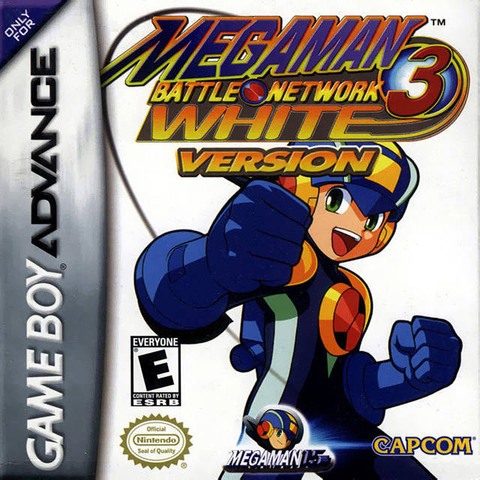
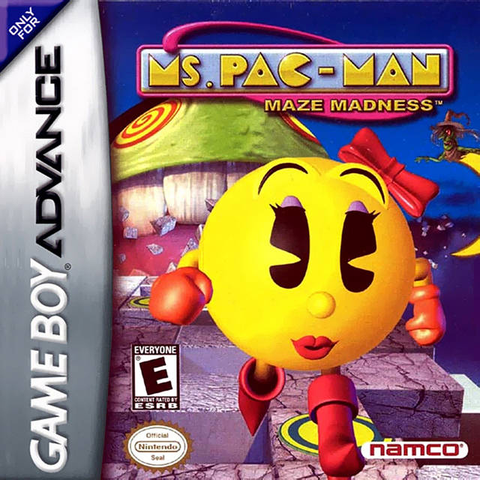
Current in-stock cartridge options include Castlevania: Circle of the Moon, Mega Man Battle Network 3: White Version and Ms. Pac-Man Maze Madness. Inventory can change, so use the product page as the final word. Have duplicate cartridges or other games ready to move? Sell your old games to Zypher.
Sources
- Nintendo Support: Game Boy Advance SP system manual, checked October 24, 2026.
- Nintendo UK: Game Boy Advance SP hardware page, checked October 24, 2026.
- Nintendo UK Support: Game Boy Advance SP technical data, checked October 24, 2026.
- Nintendo Support: licensed and unlicensed products, checked October 24, 2026.