A glowing container in Halo Infinite can mean a stronger tool, a multiplayer cosmetic or another piece of the story. Those are very different rewards. Before sending Master Chief across another hillside, work out what you are actually collecting.
This guide covers Campaign equipment and collectibles. The useful distinction is simple: Spartan Cores fund equipment upgrades. MJOLNIR Armor Lockers unlock cosmetics for Multiplayer and Academy. A new coating will not rescue Chief from the next bad decision.
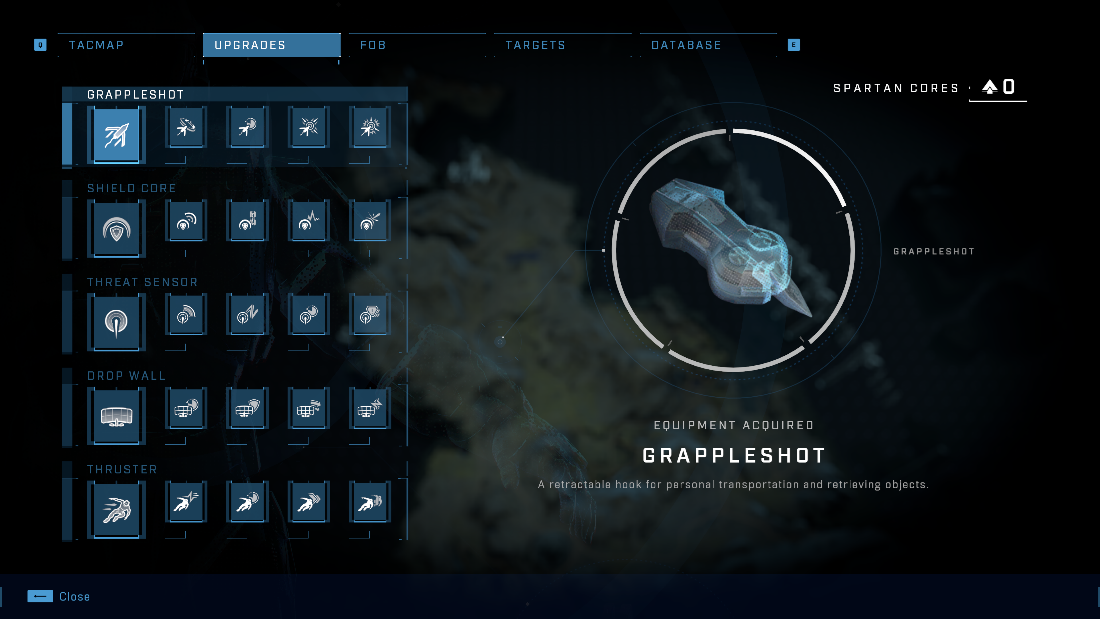
Featured image: Halo Support’s Campaign Upgrades menu, with the Grappleshot selected and other equipment already unlocked. It is an example menu, not a claim that every tool is available immediately. © Microsoft. Used with permission from Microsoft.
Find a Spartan Core, then spend it deliberately
Halo Support’s collectibles guide identifies Spartan Cores as the equipment-upgrade collectible. Their crates carry a green holographic UNSC emblem and make a beeping sound nearby. The hologram disappears after collection.
Collecting the Core is the first step. Open the TacMap, move to Upgrades, select an unlocked piece of equipment and inspect the upgrade you want. The equipment instructions say the menu displays its effect and cost before confirmation. New equipment unlocks through story missions; collecting Cores is not a substitute for reaching those unlocks.
For a first playthrough, we recommend buying an improvement that addresses a problem you can name. Want the Grappleshot available more often? Look at its cooldown upgrade. Losing your shields before you can reposition? Consider the Shield Core. Filling the next square because it is there is an expensive way to avoid making a choice.
The Grappleshot does more than move Chief
The equipment reference confirms that the Grappleshot pulls you toward surfaces and can pull lighter objects, including weapons and Fusion Coils, toward you. A yellow X in the reticle indicates a target is in range. Quickshot reduces its cooldown by 40% in Campaign.
Before investing further, notice which use you are neglecting. Traveling to a ledge and retrieving an object solve different problems with the same tool. An upgrade can improve an ability you already understand; it cannot make you remember to use it.
Campaign upgrades do not transfer to Multiplayer. Keep that boundary clear when reading a guide, comparing equipment or deciding what another Core will accomplish.
The Shield Core works without an equipment switch
The equipment guide describes the Shield Core as a passive Campaign upgrade. You do not equip it like the Grappleshot. Halo Support’s separate shield reference confirms that Spartan Cores can strengthen it through the Upgrades menu.
Read the shield display as well as the upgrade screen. The reference places shield energy in the light-blue bar at the top of the HUD and explains that it replenishes after roughly five seconds without taking damage. The depleted shield flashes red and produces a warning sound.
Treat an upgrade as extra protection, then still make room to recover. More shield strength is not a promise that standing in the same dangerous position has become a sound plan.
Read what the other upgrades actually change
The official equipment inventory lists Threat Sensor improvements including increased detection radius, an extra charge and reduced cooldown. Thruster upgrades include a second charge, a shorter cooldown and greater movement power.
These descriptions suggest different priorities. Look at whether you need more information about an encounter or more freedom to move within it. Buy for the problem you are having, then deliberately practice selecting that tool.
Check your equipment controls and practice selecting a tool before relying on it in a fight. Remapped bindings can differ. Spending a Core does little for an ability you never remember to select.
Use the map to narrow the search
Capturing a Forward Operating Base helps reveal collectibles on the TacMap. Halo Support explains that Area Collectibles shows regional progress, while a transparent collectible icon means the item has already been collected. The official Campaign overview also identifies FOBs as fast-travel points where players can summon weapons and vehicles.
A waypoint is a useful destination, not a guarantee that the item is standing in the open. The collectibles guide recommends AI Scan when something is concealed nearby. Its default controls are down on the D-pad or Z on keyboard.
A practical search routine is to check regional progress, choose a missing collectible, travel, then search the immediate space. Rechecking a cleared icon is unlikely to improve Chief’s equipment, although it will give him an excellent familiarity with that particular rock.
Armor Lockers and artifacts pay out differently
MJOLNIR Armor Locker rewards change appearance in Multiplayer and Academy, not Campaign. Forerunner Artifacts instead unlock audio recordings. Those stone-ring sites belong to the story-collection side of exploration, rather than the equipment-upgrade budget.
Use that distinction to decide which detours matter to you. If your immediate goal is improving Campaign equipment, look for Cores. If you want cosmetics or additional story material, the other collectibles have their own reasons to visit. You can enjoy all three without pretending they do the same job.
Put Halo on your Zypher shelf
Buy your next physical game from Zypher Trading Video Games. Check Halo Infinite for Xbox Series X / Xbox One, then read the selected copy’s condition and included contents. The physical listing is separate from the PC control examples in this guide.
Shop Zypher’s games, or sell your old games to Zypher when your shelf needs space for another campaign.
Sources and Zypher listing checked November 6, 2026. Upgrade suggestions are Zypher editorial judgment. All four images are complete screenshots supplied by Halo Support for the commercially released game. © Microsoft. Used with permission from Microsoft.


