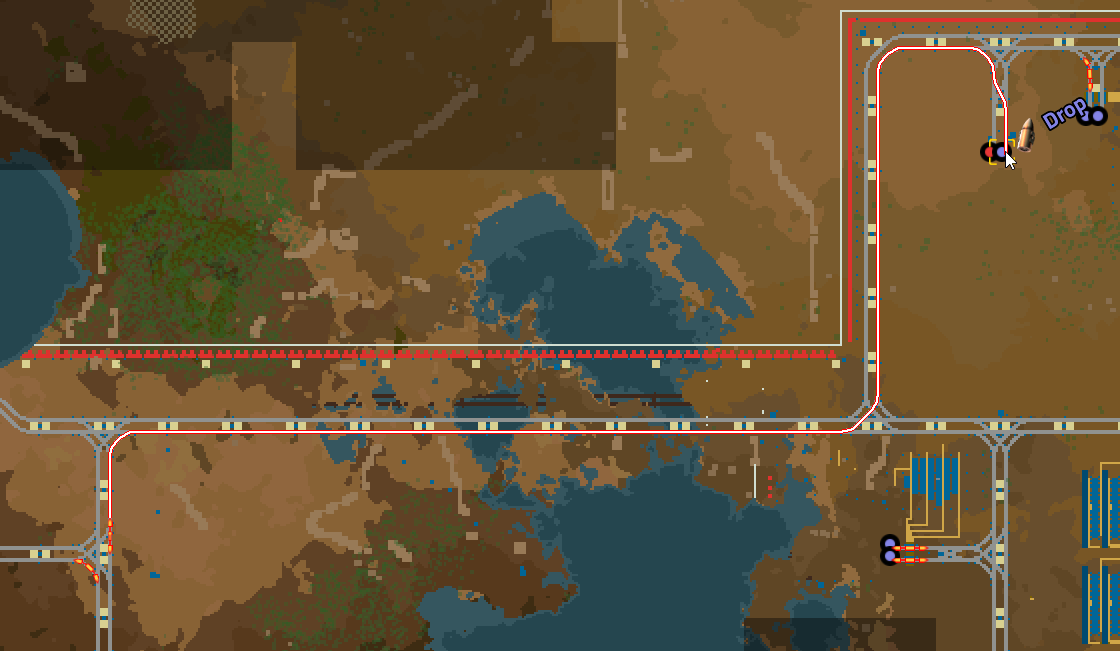
Two unloading stations can share a name in Factorio without sharing the incoming trains equally. That is useful when you want several destinations to do the same job. It is confusing when you expect the name alone to organize the traffic.
Give the stops a clear policy: how many trains may commit to each one, and which destination should get preference? This guide covers those decisions for the unmodded PC game's 2.x train-stop system, using ordinary schedules and manually chosen settings. The small example below is a suggested exercise, not a report of a Zypher playtest.
Featured image: Wube's March 22, 2024 developer preview showing the route of an incoming train. The historical images illustrate train-stop features; they are not captures of today's exact interface. © Wube Software.
A shared name creates a choice of destinations
Start with two places that can genuinely accept the same cargo. In our example, each receives copper ore and both stops are named Copper Drop. A train scheduled for that name has more than one possible destination. Wube's original train-limit explanation describes this shared-name approach and the reservation setting that makes it manageable.
Use a map note or the surrounding layout to distinguish the two locations for yourself. Do not accidentally change one stop to Copper Drop East while leaving the schedule set to Copper Drop, then expect the shared-name arrangement to remain the same. Pick the station name deliberately and keep it consistent.
Also make the physical purpose consistent. Naming an ore-unloading stop and an unrelated loading stop alike is not a clever shortcut. The name tells the schedule where it may go; it does not explain your intentions to the inserters.

Count commitments, rather than just parked trains
A train limit counts trains at the stop and trains already heading toward it. In the officially hosted train-stop reference, a stop at its limit is excluded from the next train's destination choice. Other eligible stops with the same name can still be considered.
For a first exercise, set each Copper Drop stop to a limit of one. A train heading toward the western stop has already claimed its allowance, even if the platform looks empty. Watch the next dispatch with that reservation in mind. Counting only visible parked locomotives misses part of the decision.
Choose the limit to suit the location you actually built. If you later raise it, decide where the extra committed train can wait and whether the unloading operation can serve the extra traffic. For a two-train allowance, identify a second safe waiting position before applying the setting. Leave the limit lower if that space is absent.
Priority expresses which eligible stop you prefer
Now give the receiving locations different priorities. Wube's January 26, 2024 train-stop priority explanation says destination selection prefers a higher-priority stop. The current reference describes priority being checked among valid same-name destinations.
Suppose the eastern copper receiver is the one you want served first. Give it the higher priority, while leaving both limits appropriate for their sites. When that preferred stop is full to its limit, raising its priority again will not create another reservation slot. The settings answer different questions.
Keep this exercise small enough to observe. Change the preference, follow the next dispatch, and inspect the resulting destination. If both receivers remain available but one keeps getting the work, ask whether that is the preference you configured before calling it an imbalance.

Priority also affects departure order. Wube says trains leaving higher-priority stops are dispatched first. If several loaded trains are waiting for the same destination to become available, inspect the priority where they are waiting too. In the starter exercise, leave the loading side unchanged so you can observe the destination choice first.
Changing a setting does not recall the fleet
Lowering a limit does not cancel reservations already made. Wube explicitly explains that committed trains continue to their chosen stop. The current reference likewise says a priority change alone does not redirect a train already travelling to a different stop.
So judge a change by subsequent dispatches. If you set the western limit to zero while a train is already approaching, that train continuing west is not evidence that the setting was ignored. It made its commitment earlier.
This matters when closing a receiving location. Our recommendation is to review the incoming traffic first and allow for trains already committed to arrive. Changing a limit is a routing decision for new commitments, not an emergency procedure for clearing occupied rails.
Read the stop's incoming list
Wube's March 22, 2024 interface preview introduced the Trains on the way tab and showed incoming routes on the map. Those views make the reservation idea easier to inspect: a train can count against the stop before it reaches the platform.
Use the stop view to identify a train, then follow its route. For the Copper Drop exercise, write down which receiver it chose and which limits were already occupied. That is a more useful note than “the trains are being weird,” although the second version is understandable after a long evening with rails.

Destination full is a specific clue
If every eligible stop with the required name is full to its limit, the documented state is Destination full. In the 2.x behavior Wube described, disabling a stop acts like a zero limit; an already incoming train continues, while new departures must wait or find another eligible same-name stop.
Check the name, the available stops and their commitments before increasing limits across the network. If the problem is instead a junction holding trains on shared track, our rail-signal guide covers that separate part of the railway. A dispatch preference does not replace sensible signals.
Sources and image credits
Mechanics and store destinations checked November 10, 2026. Sources are linked beside the relevant claims. Advice and the Copper Drop example are editorial suggestions based on the documented behavior, not claims of firsthand testing or a guaranteed railway design.
All images come from Wube's linked Friday Facts posts, used under its express website-asset and press-use permission. Dates and development-era interfaces are identified in the captions. Images retain their full supplied framing and proportions. No new update, current UI capture or Space Age purchase requirement is implied.


